QuotaMew v0.2.0 · Stable
Your AI coding quota, at a glance.
A native macOS menu-bar monitor for AI coding quota. Keep Codex limits and reset times visible while you work.
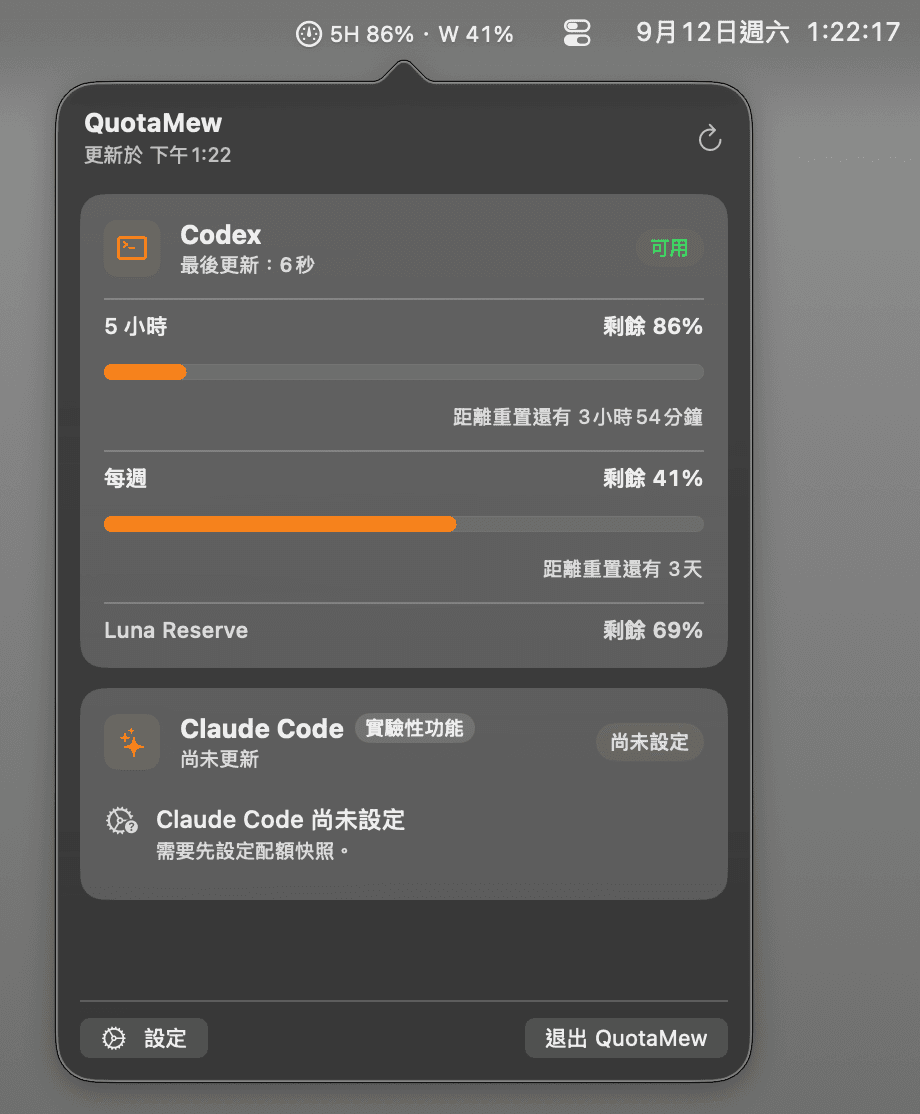
QuotaMew native macOS menu bar dashboard
Why QuotaMew
Keep quota close to your work.
Native macOS
Open a small menu-bar dashboard without adding another workspace.
At a glance
See quota and reset countdowns without repeatedly opening provider interfaces.
Your preferred display
Choose Remaining or Used, and a Single or Overview menu-bar display.
Local-first
Local settings, no telemetry, and no QuotaMew account or cloud sync.
What you can monitor
Quota windows, not billing estimates.
See 5-hour and Weekly limits when reported by the provider, plus Luna Reserve when available. QuotaMew displays provider data; it does not change your limits or activate Reserve.
Menu-bar choices
Pin a provider and select one quota in Single mode, or show regular windows together in Overview.
Reset reminders
Optional local notifications use fresh quota data to remind you before a reset or when a reset is detected.
Supported providers
Start with Codex.
Codex
Uses a compatible local Codex runtime, including supported packaged ChatGPT / Codex Desktop runtimes. Codex manages sign-in.
Claude Code
A limited local snapshot reader. Bridge setup and live subscribed-account validation are not complete; installing Claude alone does not enable quota monitoring.
Quota metadata, with clear data boundaries.
No telemetry or advertising analytics. Stable quota monitoring does not collect prompts or source code. Settings and bounded notification state stay on your Mac; the provider runtime manages its own network access.
Read the privacy detailsInstall, then look in the menu bar.
Move QuotaMew from the DMG to Applications. macOS may require individual app approval on first launch. Onboarding introduces display preferences; it does not install or sign in to a provider.
Installation and first-launch guidanceDocumentation & source
Free and open source.
Use the guides to get started, or visit GitHub for source code, release notes and issue reports.